Referrals Filed to the Right Patient, Without the Retyping.
Clinic Referral Inbox reads every referral PDF that lands in your clinic inbox. It finds the patient in Cliniko and asks your front desk to confirm. Then it files the referral onto the right record. Your staff press one button instead of downloading, searching and uploading by hand.
What Clinic Referral Inbox Is
Clinic Referral Inbox is a referral automation service for Australian allied health clinics that use Cliniko. It reads the referrals that arrive in your clinic’s email inbox, matches each one to the right patient in Cliniko and files the PDF once a staff member approves. Backbone Automation builds, sets up and supports it from Devonport, Tasmania.
Key facts
- Works with: Cliniko, and the email inbox your referrals already arrive in.
- Reads: GP referrals, care plans, NDIS plan pages and specialist letters. Invoices and newsletters are recognised as not referrals.
- Who decides: your staff. Nothing is filed without a person pressing File it.
- Built for: physio, psychology, OT and NDIS providers with 1–5 practitioners.
- Price: $1,497 setup + $199/month for founding clinics. Standard price $2,497 + $249/month. AUD, excluding GST.
- Also available: Care Plan Tracker, which keeps Medicare GP reports and session limits on track, on the same review page.
- Page last updated: .
Where the Referrals Get Stuck
The Inbox Piles Up
GP referrals, care plans and NDIS paperwork arrive all day. Every one waits until someone has time to open it.
Filing Is Slow and Risky
Download, search the patient, upload, rename, repeat. Two patients with the same surname is all it takes to file a referral on the wrong record.
A Waiting Referral Is a Waiting Patient
Until the referral is on file, nobody rings to book. The patient waits, or books somewhere else.
How Cliniko Referral Automation Works
A referral arrives
An email with a PDF, or even a phone photo of the letter, lands in your clinic’s referral inbox, as it does today. Nothing changes for your referrers.
AI reads the paperwork
It pulls out the patient’s name and date of birth and the referring doctor. It flags a referral as urgent only when the document itself says so.
It finds the patient
It looks up the patients in Cliniko with that date of birth, then checks the surname. If more than one patient fits, or none does, the referral goes to a person.
Your staff approve it
Reception gets a ping with a link to a private review page. They sign in, check the suggested patient side by side and press File it, Wrong patient or Skip. File it puts the PDF on the patient’s record in Cliniko.
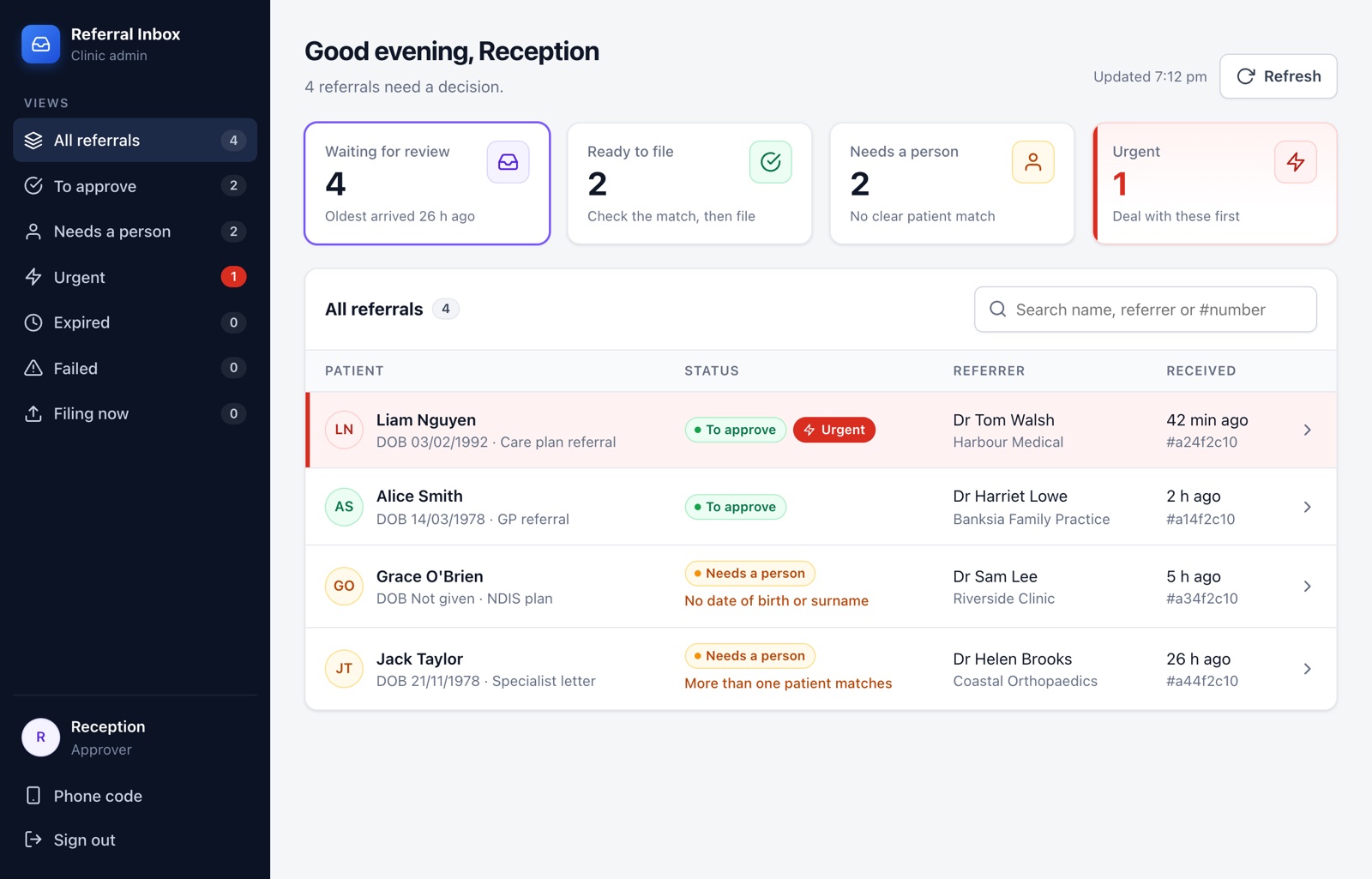

Follow one referral through
When it isn’t sure, it says so. A referral with no date of birth, two patients with the same birthday, or no match at all shows as “needs a person” on the review page instead, with Retry match, Done by hand and Skip. If the patient isn’t in Cliniko yet, staff add them and press Retry match.
A Person Approves Every Filing
Filing a referral to the wrong patient is a privacy breach. So the system suggests and your staff decide.
Nothing Is Filed Without a Button Press
Every match waits for a staff member. A missing date of birth always goes to a person, never to a guess.
Admin Only
It never creates patients and never judges anything clinical. It reads paperwork so your team doesn’t have to retype it.
Nothing Gets Lost
Every email ends up labelled: filed, needs a person, or not a referral. A daily summary shows what’s still waiting, and the same email is never filed twice.
Proven on a Full Test Clinic
We built a test clinic in Cliniko with fake patients. It includes the cases that catch filing out: two patients with the same surname, and two with the same name but different birthdays. Then we sent it 18 fake referrals, and ran the same tests on two AI models, Claude Sonnet 5.5 and Claude Opus 5.5. Sonnet scored higher, and it’s the cheaper of the two, so that’s the one we use.
Test cases passed from start to finish: the right patient, the right status, the right email label and the right message.
Patient names and dates of birth read correctly. The other three tests were an invoice, a newsletter and the same email sent twice.
Times it followed instructions hidden inside a document. One test referral tried, and the system ignored it.
Medicare GP Reports and Session Limits, Tracked for You
Medicare expects a written report to the referring GP after a patient’s first and last session on a care plan. In most clinics that’s tracked from memory, so reports get missed and sessions run out without warning. Care Plan Tracker reads the Medicare cases and appointments already in your Cliniko account, works out what’s due and puts each job on a task list for your front desk.
GP Reports Due
A report task opens after the first session, and again when the referral ends: the case is closed, the GP’s session limit is used, or there’s been no visit for three weeks with nothing booked. Each one has a due date, and past-due reports show in red.
Session Limits
Medicare pays for 5 allied health sessions per patient each calendar year. Staff are warned when one session is left and when all 5 are used, so the patient hears it before their next visit. It counts the sessions in your clinic; visits elsewhere don’t show in Cliniko.
Referrals Running Out
New referrals last 18 months unless the GP writes otherwise. It warns before a referral ends while the patient is still in treatment. From 1 March 2027 it lists every patient still on an old GP plan, because those stop working on 30 June 2027.

Staff still write and send each report in Cliniko from their usual template, then press Done. If a task isn’t needed, they press Not needed and pick a reason, such as “already sent” or “patient is continuing”. Set-up slips go to a person too: a care-plan visit with no Medicare case, a case with no referring GP, or a referring contact that isn’t set up as a doctor. Each morning a Telegram message gives the counts, and each Monday the owner gets a short email summary. Neither holds a patient name.
Read Only, and Nothing Clinical
Care Plan Tracker reminds and keeps count. Your team decides and writes everything.
It Never Changes Cliniko
It only reads. It never writes a letter, books an appointment, edits a record or contacts a GP or patient. A person closes every task.
No Names Saved
The task list holds Cliniko record numbers, not names. Names are read from Cliniko when staff open the page, and never go into messages, emails or alerts.
When It Isn’t Sure, It Asks
If a case can’t be read cleanly, such as a missing referral date, it goes to a person instead of a guess.
Test cases passed, including the edges: a visit at 12:30 am on New Year’s Day, cancelled and missed visits, and sessions spread across two referrals.
Fake patients in a test Cliniko clinic, each set up for a different case. Every expected task opened, and running it again opened nothing extra.
Patient names in the daily message, the weekly email or the failure alerts. They hold counts only.
From One Inbox to a Clinic Whose Admin Runs Itself
Small clinics lose hours every week to the same jobs. They chase paperwork, patients, funding and payments, and they type notes after hours. The referral inbox is step one. Each next piece follows the patient’s path through the clinic, so they work together instead of being separate tools.
- 1. Get every referral booked (started: the referral inbox works)A referral on file is no use if the patient never books. The day a referral is filed, staff can send the patient a text with a booking link in one tap. A chaser puts any referral with no appointment after 7 days on a call-back list. When a GP leaves out a date of birth or plan details, it drafts the email back to them for staff to approve.
- 2. Keep the diary fullMissed calls are missed bookings. An AI receptionist answers when the front desk can’t, and anyone who hangs up gets a text back. Reminders go out before every visit and patients confirm by reply, so fewer people forget. When someone cancels, the spot is offered to the waitlist straight away. Patients partway through treatment with no next booking get a nudge to rebook. A few months after care ends, past patients get a check-in. New patients get a welcome, a booking link and the intake form, and their answers go straight into their record. If the clinic runs classes like Pilates or hydro, bookings, class packs and pack expiry reminders run the same way. Every patient gets the same friendly request for a Google review after their care, not just the happy ones. Reviews stay on Google and are never reused on the clinic’s website, social media or ads.
- 3. Keep the funding on track (started: Care Plan Tracker works)Before the first visit, the system checks the paperwork for what pays for it: a current care plan, NDIS plan dates, or a WorkCover claim number. NDIS service agreements and consent forms go out with the intake form, and staff are warned about anything unsigned before the visit. A Medicare care plan only covers so many sessions, and NDIS plans end. The system counts sessions used, warns before they run out, and reminds staff before reports are due or a plan expires. WorkCover and insurer approvals are tracked the same way, with warnings before approved sessions run out and reminders when treatment plans or certificates of capacity are due.
- 4. Less typing after every session, with the scribe you already usePlenty of clinicians already use an AI scribe like Heidi, which writes the session note and files it into Cliniko. We don’t build another one. We set it up properly for the clinic, with note templates that match what audits and funders ask for. Then we automate the paperwork that comes after the note: the report back to the GP that a care plan expects, the NDIS progress reports due before a plan ends, and a discharge summary to the GP when care finishes. The clinician checks and signs everything before it’s sent.
- 5. Show the resultsPatients fill in a short standard questionnaire at the start and end of care, such as a pain and function score. The scores flow into the reports to funders and GPs, so each one shows real progress. NDIS, WorkCover and insurers often ask for this kind of proof.
- 6. Get paid without chasingInvoices go out when the appointment ends. NDIS claims are gathered into the bulk claim file staff upload to the NDIS portal, and plan-manager invoices are grouped and sent. WorkCover and insurer invoices go in the right format with the claim number. Unpaid invoices get polite reminders, and payments are matched in Xero each day so the books stay up to date.
- 7. Keep the clinic running behind the scenesThe clinic inbox sorts itself into referrals, invoices, patient questions and junk. Specialist letters, scan results and insurer letters are matched to the right patient and filed once staff approve, just like referrals. Anything that can’t be matched goes to a person. Each GP who refers gets a thank-you, and the clinician approves the update the GP gets when care ends. Requests for records from patients, lawyers or insurers are logged and tracked to their due date, and nothing is released until a person has checked identity and consent. Complaints are logged and followed until they’re answered, which registered NDIS providers must do. Staff are warned before their registration, worker screening checks or insurance expire. Each week the owner gets a short report showing how full each diary was, cancellations, rebookings, money in, and which GPs sent the most patients.
- 8. Safe by designAnything clinical goes to a person. If a patient’s message mentions something like chest pain or self-harm, staff are alerted straight away and the system hands over to a person instead of replying on its own; anyone describing an emergency is told to call 000. Each clinic gets its own private system, hosted in Australia, encrypted, backed up, kept up to date and locked behind two-step login. It only keeps patient details as long as it needs them. Texts never mention a patient’s condition, and patient information is never sent to a GP, insurer, lawyer or anyone else outside the clinic without a person approving it. Patients agree to texts and emails when they fill in the intake form. Every workflow alerts us if it stops working, so nothing fails quietly. We also help the clinic update its privacy policy for the new rules on automated decisions that start in December 2026.
- 9. Work with any clinic softwareThe same help for clinics on Halaxy or Splose, not just Cliniko.
Where we are today. Two pieces work and have passed every test on a fake clinic: the referral inbox (step 1) and Care Plan Tracker for Medicare GP reports and session limits (step 3). Everything else here is planned, and each piece will be tested on a fake clinic before it touches a real patient.
Clinic Referral Inbox
Referral Inbox for Cliniko
For allied health clinics with 1–5 practitioners
Founding price for our first three clinics, with the monthly price locked for 12 months. After that, the standard price is $2,497 one-time + $249/mo.
- Set up on your referral inbox and your Cliniko account
- A separate Cliniko user for the system, with only the access it needs
- Staff approval buttons, email labels and a daily summary
- Monitoring and fixes included in the monthly fee
Built for physio, psychology, OT and NDIS providers.
The fine print
- Cliniko only, for now. If your clinic runs Halaxy, Splose or another system, tell us at your audit.
- You supply your own accounts. Your Cliniko subscription and your email account stay yours. We set up the connection, you own it.
- Privacy first. Before it handles real patient details, we agree in writing how your clinic’s data is handled and stored.
- No lock-in. Cancel the monthly plan with 30 days’ notice.
- All prices are in AUD and exclude GST.
- Independent service. Cliniko is a trademark of its owner. Backbone Automation isn’t affiliated with or endorsed by Cliniko.
Questions Clinic Owners Ask
Does the AI make any clinical decisions?
No. It reads names, dates of birth and referrer details so the referral can be filed. It never triages, summarises or interprets clinical content.
What kinds of documents can it read?
GP referrals, care plans, NDIS plan pages and specialist letters, in different layouts. If an email holds something that isn’t a referral, such as an invoice or a newsletter, it’s labelled as not a referral and nothing is filed.
What if it picks the wrong patient?
It can’t file anything on its own. Your staff see the suggested match and press Wrong patient if it’s not right. Unclear matches go straight to a person.
Will it create new patients in Cliniko?
Never. If the patient isn’t in Cliniko yet, the referral waits for your staff. Once they add the patient, one button tries the match again.
Where does patient information go?
The PDF is read by an AI service, then filed into your Cliniko account. The system keeps its own short record of each referral so nothing gets lost. The patient details in that record are cleared 7 days after the referral is finished. Patient details never go into logs, alerts or error messages. Before go-live we agree in writing how your clinic’s data is processed and stored.
Is it running in clinics already?
Not yet. It’s fully built and tested on fake patient data, and we’re looking for our first clinics. Founding clinics work directly with the person who built it.
Can you add other clinic automations?
Yes. Missed-call text-back and an AI voice receptionist are already built and can be set up for clinics. See all services.
Guides for Allied Health Clinics
Patient Waitlist Management for Allied Health Clinics
A late cancellation doesn't have to sit empty. See how allied health clinics fill cancelled slots fast, without extra admin work or extra hands.
Read the guide →Patient Appointment Reminder System for Allied Health Clinics
Automatic patient appointment reminders, recall texts and missed-call text-back for physio, chiro and psych clinics. Live in days, published pricing.
Read the guide →Ready to stop filing referrals by hand?
No lock-in contracts. No jargon. A person approves every filing.